
Indexing
Kodik builds a local semantic index of your workspace. The codebase_search tool uses this index to search code by meaning, not just exact text matches.
How Indexing Works
Section titled “How Indexing Works”On startup Kodik splits the text files in your workspace into overlapping chunks (up to 80 lines each), computes vector embeddings via the embeddings API, and stores the results in a local SQLite database inside the extension. When the agent calls codebase_search, your query is converted into a vector using the same model and matched against the stored embeddings.
The index is stored locally: workspace files and embeddings never leave your machine. Data persists between sessions so re-opening a workspace does not require a full re-index.
Automatic Updates
Section titled “Automatic Updates”Indexing starts automatically when you open a workspace. Kodik watches for file changes and updates the index incrementally, processing only the files that changed.
| Change | Action |
|---|---|
| New files | Automatically added to the index |
| Modified files | Old embeddings are removed and new ones are created |
| Deleted files | Removed from the index |
Partial sync is debounced to avoid interfering with active editing. Changes to .gitignore or .kodikignore trigger an immediate full re-index.
If indexing is interrupted (for example when the IDE is closed), a saved checkpoint allows it to resume from where it left off.
What Gets Indexed
Section titled “What Gets Indexed”By default Kodik indexes all text files except:
- files listed in
.kodikignoreor.gitignore— see Ignore Files - standard build and dependency directories (
node_modules,dist,build,.git,.kodik, etc.) - binary and media files (images, audio, video, archives, compiled artifacts)
- files larger than 512 KB or empty files
The index is capped at 50,000 chunks and 32 MB of total text, which is sufficient for most repositories. Files that exceed the budget are skipped.
Configuration
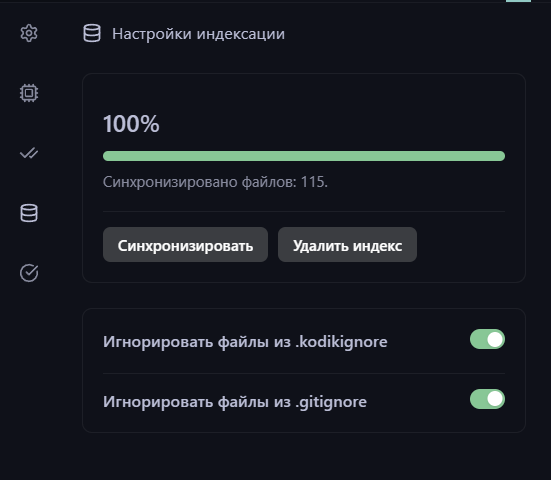
Section titled “Configuration”Check indexing status or trigger a re-index from Kodik Settings → Indexing Settings. From there you can also:
- pause or resume automatic sync;
- disable
.kodikignoreor.gitignorefiltering; - clear the index.
When indexing is paused, Sync resumes automatic sync and runs a fresh reconcile so pending file changes are added to the index.
Privacy and Security
Section titled “Privacy and Security”The index is stored locally on your machine. File content is used only to compute embeddings through the API; source code is not retained on Kodik servers in readable form. To exclude sensitive files from the index, add them to the ignore files.