
Sub-agent model
Sub-agents are child tasks that Kodik’s main agent spawns to carry out individual steps. By default a sub-agent uses the same model as the main chat. If you prefer, you can assign sub-agents their own model — for example, a lighter and cheaper one for routine tasks.
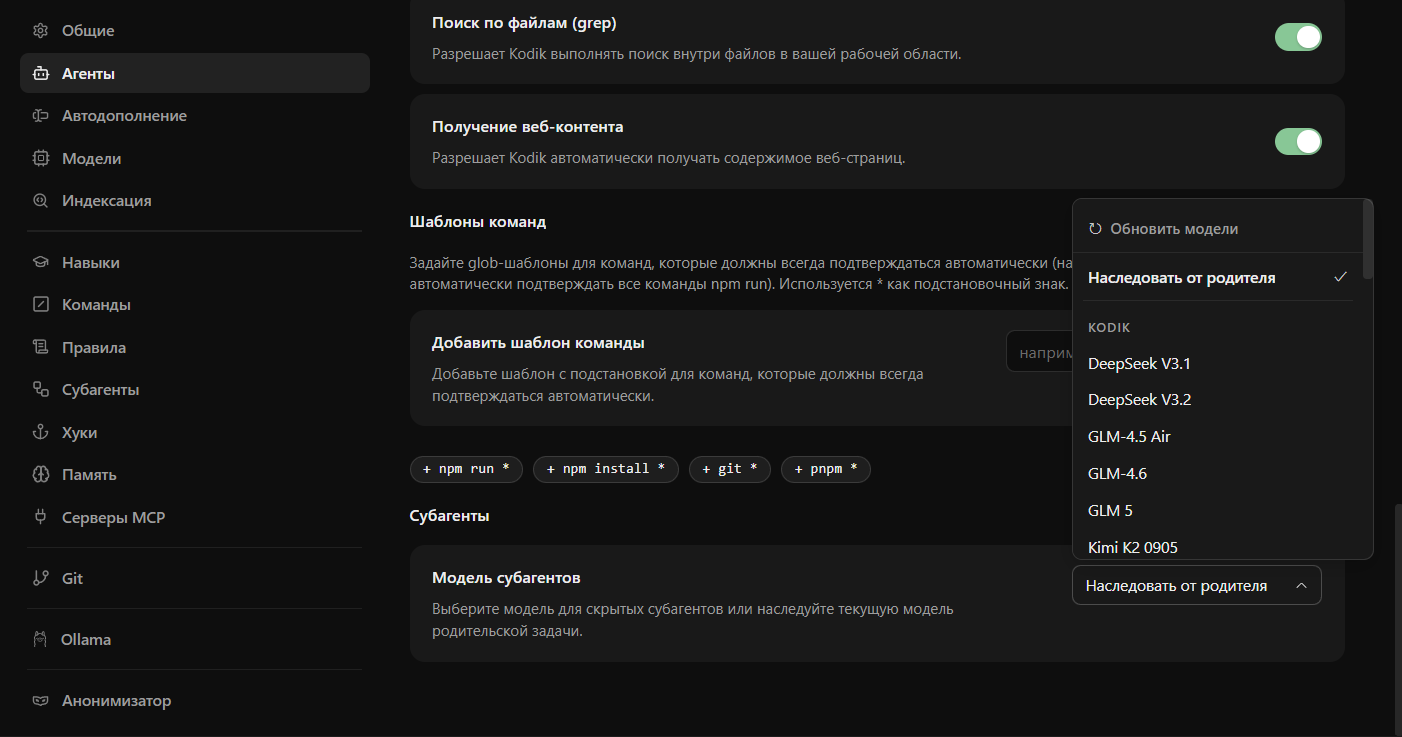
Configuration
Section titled “Configuration”Go to Kodik settings → Sub-agent and choose a provider and model for sub-agents. The following options are available:
subAgentModelProvider value | Description |
|---|---|
kodik | The Kodik managed cloud. Set the specific model in subAgentModelId. |
ollama | Local Ollama. Set the model in subAgentModelId. |
custom-provider | One of your configured Custom Providers. Set its identifier in subAgentCustomProviderId and the model in subAgentCustomModelId. |
If subAgentModelProvider is not set, sub-agents inherit the main chat provider and model.
Provider deletion
Section titled “Provider deletion”If you delete a Custom Provider that was assigned to sub-agents, Kodik automatically clears the related settings (subAgentModelProvider, subAgentModelId, subAgentCustomProviderId, subAgentCustomModelId). This prevents sub-agents from trying to use a provider that no longer exists.
After the reset, sub-agents fall back to the main chat model.
When this is useful
Section titled “When this is useful”- Saving credits: use a model with a lower credit multiplier for auxiliary steps such as search or analysis of small code fragments.
- Lower latency: a lightweight local model via Ollama responds faster for simple tasks.
- Privacy: sub-agent tasks that process sensitive data can be routed to a local Ollama instance while the main chat stays in the cloud.
For more on how sub-agents work in general, see sub-agents.