AI Commit Messages
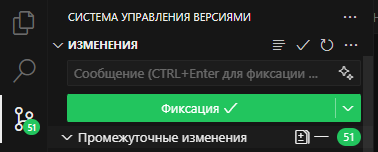
Kodik can write a commit message for you directly from the Source Control panel — one click is all it takes.
How it works
Section titled “How it works”- Stage the changes you want to commit (
git add). - In the Source Control input box, click the ✦ (sparkle) icon on the right.
- Kodik analyzes the staged diff, infers the commit style from your repository history, and streams the result into the input box.
Generation uses the Kodik backend configured for the IDE, including kodik.apiBaseUrl when you run against a self-hosted or proxied backend.
While generation is in progress the icon changes to a stop button — click it to abort. The commands are also available from the Command Palette: