
Custom providers (BYOK)
Custom Provider lets you connect any API that follows the OpenAI or Anthropic format. This includes large cloud services (OpenRouter, Groq, Mistral, and others) as well as local proxies and self-hosted servers.
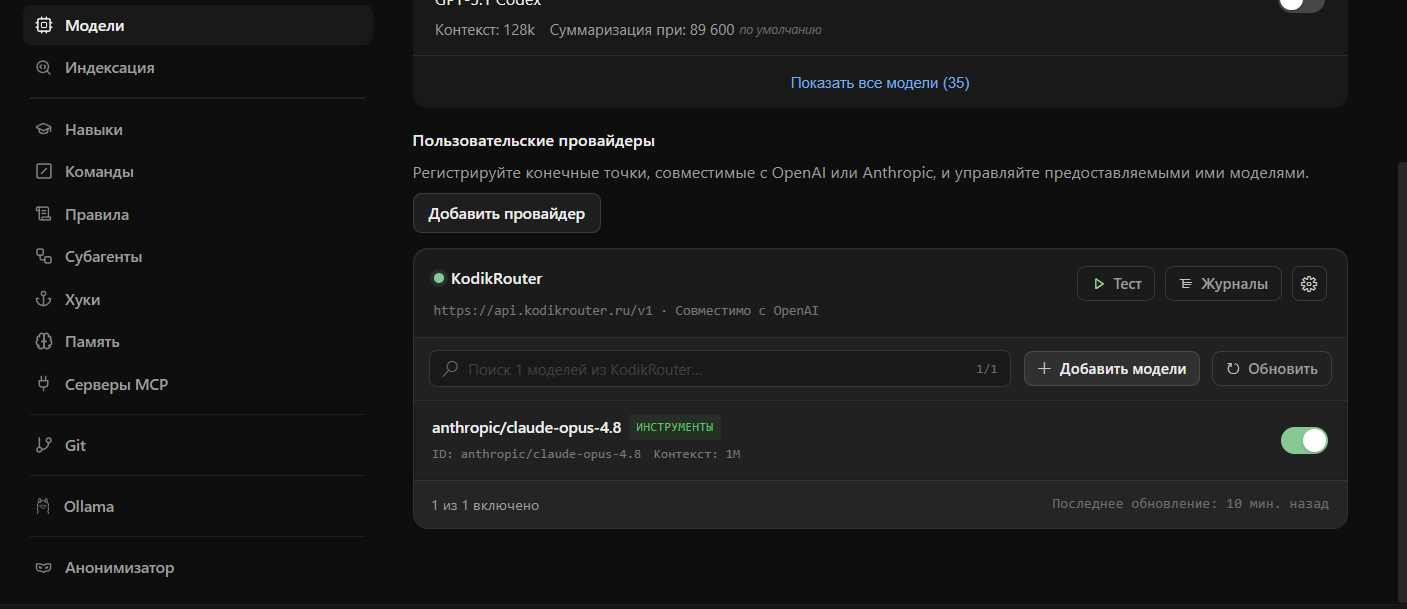
Adding a provider
Section titled “Adding a provider”Go to Kodik settings → Provider → Custom Provider → Add provider. Fill in the following fields:
| Field | Description |
|---|---|
| Name | A display name of your choice |
| Base URL | The root address of the API (see URL requirements) |
| API Key | Authorization key (optional if the endpoint does not require one) |
| Format | openai (default) or anthropic |
| Custom headers | Additional HTTP headers as key-value pairs |
| Streaming | Enabled by default; disable if the provider does not support it |
After you click Continue, Kodik checks the endpoint, fetches its model catalog, and asks you to pick the models you want — at least one is required. The provider is created only when you confirm your selection; closing the wizard without confirming adds nothing.
URL requirements
Section titled “URL requirements”- Both
http://andhttps://base URLs are accepted, for any endpoint — local or remote. A host entered without a scheme is treated ashttp://. /responsesendpoints are not supported — use a base URL or a/chat/completionspath.- If you enter a URL ending in
/chat/completions(OpenAI format) or/messages(Anthropic format), Kodik automatically strips the suffix and infers the correct base path.
Model discovery
Section titled “Model discovery”When you add or update a provider, Kodik fetches the model list from the /models or /v1/models endpoint. Discovered models appear in the model selector along with metadata: name, description, context window size, and image/tool support flags if the provider returns them.
Each model row in the provider card shows VISION, TOOL USE, and THINKING capability badges — they are clickable toggles (colored = on, dimmed = off). If automatic detection doesn’t match what your model actually supports, click a badge to flip that capability.
When a selected custom-provider model has image support enabled, the chat Add Files & Images picker accepts image files and sends them as image attachments. Models without image support keep the picker limited to regular file context.
The “Context” value on a model row is also click-to-edit. Set the real window for models whose provider doesn’t report one — Kodik otherwise assumes 128k, which makes small local models overflow mid-task. A manually set value sticks across catalog refreshes; clear the field to return to automatic.
Reasoning-capable models get a per-model reasoning selector in the chat model picker, the same control Kodik models have. When the provider’s catalog advertises the model’s reasoning modes (LM Studio’s native API reports the exact options and the default), Kodik offers exactly those, with the provider default preselected. Models whose catalog advertises nothing get the standard effort list (None…X-High) with Medium preselected. Your choice is saved on the model and applied to every request — as reasoning_effort for OpenAI-format providers, as OpenRouter’s unified reasoning object for OpenRouter, or mapped to a thinking budget for Anthropic-format providers.
If the first model-catalog response is empty, Kodik waits briefly and retries before showing the picker. If the models endpoint is unreachable or still returns an empty list, Kodik still lets you use the provider — just select the model name manually.
Health indicator
Section titled “Health indicator”A colored dot is shown next to each provider in the list:
| Color | Status | Meaning |
|---|---|---|
| Green | ok | Provider responds quickly |
| Yellow | degraded | Response took more than 3 seconds |
| Red | unreachable | Provider is down or returned an error |
Kodik checks each provider’s health every minute by fetching its model list. The status updates automatically without a page reload.
Request logs
Section titled “Request logs”Use Logs on a provider card to inspect recent chat requests sent to that custom provider. Each entry shows the model, endpoint, status, duration, and token usage when the provider reports it.
The Copy as curl action copies a reproducible request with secrets redacted: the API key is replaced with $PROVIDER_API_KEY, and sensitive headers are hidden.
Known provider auto-detection
Section titled “Known provider auto-detection”Kodik recognizes popular services from the base URL and automatically applies appropriate defaults:
| Service | URL | Default format |
|---|---|---|
| OpenRouter | openrouter.ai | openai |
| Groq | groq.com | openai |
| Together AI | together.xyz | openai |
| Mistral | mistral.ai | openai |
| Perplexity | perplexity.ai | openai |
| Fireworks | fireworks.ai | openai |
| DeepSeek | deepseek.com | openai |
| LM Studio | localhost:1234 | openai |
| LiteLLM | localhost:4000 | openai |
For unrecognized URLs Kodik defaults to openai format. You can override any setting manually.
Detection only affects branding and connection defaults — it never limits what a provider can do. Every model starts with tool use enabled regardless of where the provider is hosted, so agent features (file edits, terminal, MCP servers) work out of the box; a capability is only turned off when the provider’s own model catalog reports that the model does not support it.
Custom headers
Section titled “Custom headers”The Custom headers section lets you add arbitrary HTTP headers to every request. This is useful, for example, for authentication via X-Custom-Auth or for passing provider-specific routing parameters.
Editing and deleting providers
Section titled “Editing and deleting providers”Click a provider card to open its settings and make changes. Delete a provider using the Delete provider button inside that card.