
@ Mentions
@ Mentions let you bring files, folders, and terminal output directly into the conversation context — no copy-pasting needed.
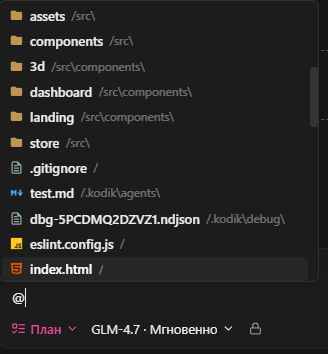
Type @ in the chat input to open the mentions menu.
Mention Types
Section titled “Mention Types”Syntax: @/path/to/file or @"/path with spaces/file.ts"
Kodik includes the full contents of the file in context. Paths are relative to the workspace root.
Folders
Section titled “Folders”Syntax: @/path/to/folder
Kodik includes the listing of the folder. Folder mentions are treated separately from file mentions (internal tag @folder:): clicking one in the panel opens the folder in the file explorer rather than opening a file.
Line ranges
Section titled “Line ranges”A line range can be appended to any file mention:
- Single line:
@/src/index.ts#L42 - Range:
@/src/index.ts#L10-L50
The #L... suffix tells the agent which part of the file is most relevant, and is also used for navigation (the file opens at that line).
Terminals
Section titled “Terminals”Syntax: @terminal:<terminal name>
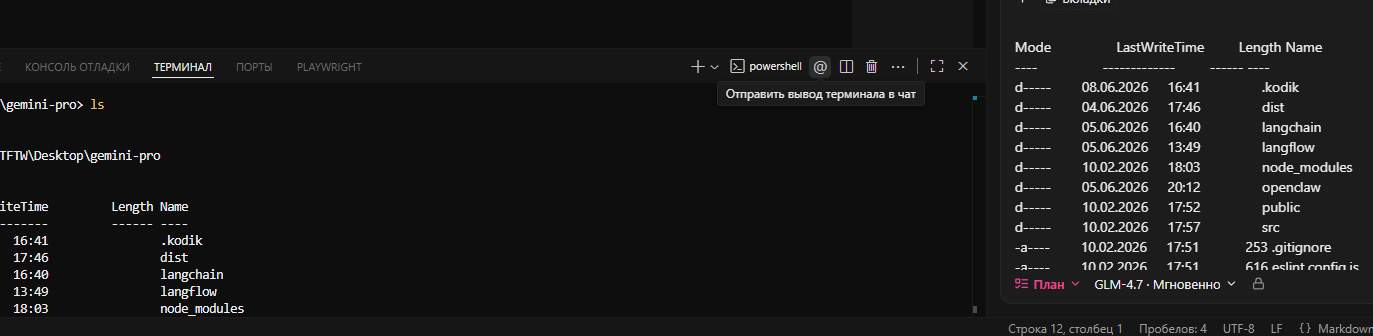
Attaches the output of the running terminal with the given name. Kodik captures up to 200 of the most recent lines from the terminal scrollback. If no terminal with that name is found, or its buffer is empty, this is indicated explicitly in context.
Examples: @terminal:bash, @terminal:npm run dev
How mentions are processed
Section titled “How mentions are processed”When you send a message, Kodik processes all mentions and builds a <user_mentions> section in the context. File and folder mentions are passed as paths relative to the workspace root. Files blocked by .kodikignore are excluded from context.
Terminal mentions are delivered in a separate <terminal_context> section and are not mixed with file mentions.
Example usage
Section titled “Example usage”I'm getting an error in @/src/api/users.ts#L34-L56
Here is the config: @/vite.config.ts
Build output: @terminal:npm run buildCheck the whole structure: @/src/componentsGetting Started
Section titled “Getting Started”- Type
@in the chat input. - Select a mention type from the menu, or keep typing the path.
- Send your message as usual.
Kodik automatically processes the mentions and includes the referenced content before calling the model.